Visualize TOEFL Speaking
Designing and Iteratively Improving a Mobile Learning Experience for English Speaking Practice
Overview
I led the design team and developed Visualize TOEFL Speaking, a mobile learning application created to help English as a Foreign Language (EFL) students practice TOEFL speaking skills anytime and anywhere.
Rather than beginning with technology features, the project began with learner needs. Through surveys, interviews, literature review, prototyping, and user testing, I helped translate learners' challenges into a mobile learning experience that combined short instructional videos, authentic speaking practice, voice recording, peer interaction, and personalized instructor feedback.
The project followed a design-based research approach using an adapted IDEAS-R framework: Empathize → Specify → Ground → Ideate → Prototype → Gather → Build → Pilot → Redesign. This iterative process allowed learner and expert feedback to directly shape both the instructional design and the application itself.
Screenshot of Visualization TOEFL Speaking Login Page

The Challenge
01 — From Generic Language Apps to a Specific Learner Need
How might I design a mobile experience around what EFL learners actually need?
Many existing language-learning applications supported vocabulary, pronunciation, or general speaking practice, but few combined TOEFL-specific speaking practice with personalized instructor feedback. Some allowed students to record themselves, but learners were often expected to evaluate their own performance.
02 — Turning Speaking Practice into a Mobile Learning Experience
How might I create authentic speaking practice on a small screen?
Speaking is a performance skill. Learners need more than information about vocabulary, grammar, and pronunciation—they need repeated opportunities to listen, prepare, speak, receive feedback, and try again.
The challenge was to translate that practice cycle into a self-paced mobile experience that learners could access anywhere while maintaining meaningful interaction with instructors and peers.
03 — Designing Through Evidence, Not Assumptions
How might learner feedback continuously shape the product?
Rather than designing the entire application and evaluating it only at the end, I used an iterative design process involving target learners and a faculty subject-matter expert throughout development.
Early prototypes were evaluated, revised, built, piloted, and redesigned. Each iteration surfaced new needs—from where the recording button should appear to how long instructional videos should be.
My Role
Lead learning Experience Designer & Researcher
-
Learner needs analysis
-
Mobile learning design
-
Learning activity design
-
Storyboarding and prototyping
-
UI/UX design
-
SME collaboration
-
Formative evaluation
-
User testing
-
Design-based research
-
Iterative redesign
Design Process
Empathize
Understanding Learners Before Designing the Solution
I began by investigating the experiences and needs of EFL learners rather than assuming what a mobile language-learning application should contain.
Thirty intermediate-level EFL students participated in the initial needs assessment. Learners identified several challenges with spoken English, including selecting appropriate words and expressions, understanding others during conversation, organizing sentences, and preparing for TOEFL speaking tasks. Importantly, 90% expressed interest in learning through mobile applications, and their most preferred activities included watching tutorial videos, taking quizzes, and recording their voices.
Key Learner Insights
Learners needed:
-
Flexible opportunities to practice speaking
-
Support organizing spoken responses
-
Useful vocabulary and expressions
-
TOEFL-specific practice
-
Opportunities to record their own speech
-
Personalized feedback
-
Short, accessible learning experiences
Translating Learner Needs into Learning Goals: Create a self-paced mobile learning experience that combines instruction, speaking practice, audio submission, and feedback to strengthen TOEFL speaking skills.
The experience was designed to help learners:
-
Structure speaking responses using personal experiences and examples
-
Apply useful expressions when speaking
-
Prepare a focused response within TOEFL time constraints
-
Deliver clear and fluent spoken responses
These goals became the foundation for both instructional content and product functionality.
Design Rationale
Designing at the Intersection of Learning Science and Mobile UX
The application was grounded in constructivist learning theory, Cognitive Load Theory, mobile learning research, and learner-centered design.
Rather than treating these theories as abstract principles, we translated them into concrete design requirements for the application.
-
Constructivism→ authentic speaking tasks, peer collaboration, self-paced practice
-
Cognitive Load Theory→ concise content, segmented videos, streamlined mobile experiences
-
Scaffolding→ examples, structured speaking strategies, repeated practice
-
Mobile Learning→ anytime/anywhere access, mobile-friendly UI, instructor accessibility
-
Formative Feedback→ record → receive personalized feedback → practice again
Design Decisions
1. From Learning About Speaking → Practicing Speaking: Voice Recording
Need: Learners needed opportunities to actually practice spoken English rather than simply consume instructional content.
Design: I incorporated voice recording directly into the learning experience so learners could respond to TOEFL-style prompts using their mobile devices.
Why: Speaking proficiency develops through performance and repeated practice, not passive content consumption.
2. From Generic Feedback → Personalized Instructor Feedback
Record → Submit → Feedback → Retry
Need: Existing apps often lacked personalized feedback on learners' speaking performance.
Design: Learners could submit audio responses and receive personalized instructor feedback, then practice and submit another response.
Why: Feedback turns recording from a self-practice feature into a scaffolded learning cycle.
3. From Isolated Learning → Peer Interaction: Discussion Board
Need: Mobile learning can become isolating when learners interact only with content.
Design: I incorporated discussion activities where learners could respond to authentic prompts and engage with peers.
Why: Speaking develops through communication and social interaction, not only individual practice.
4. From Abstract Language Instruction → Authentic Practice: Real-World Speaking Prompts
Need: Learners needed opportunities to connect TOEFL strategies with realistic communication.
Design: Speaking activities incorporated authentic prompts, such as introducing oneself, alongside TOEFL-specific tasks.
Why: Authentic contexts help learners transfer vocabulary, sentence structures, and speaking strategies into meaningful communication.
Build
Prototype
Before programming began, I developed storyboards and an initial prototype to translate the instructional principles into a tangible mobile experience. The first prototype included a home page, lesson experience, voice-recording functionality, and supporting information.
Gather & Build
We collected formative feedback from both the faculty SME and target users. One particularly actionable learner insight was that students wanted to record their responses immediately after viewing the tutorial video rather than navigate elsewhere in the application.
Feedback: Recording should be closer to the learning activity.
Design Decision: Move voice recording directly into the lesson workflow.
UX Improvement:Watch → Practice → Record
Evaluate & Refine
Twenty EFL learners participated in pilot testing through one-to-one observation and focus groups. Testing identified several important opportunities for improvement.
Finding 01. Tutorial videos were too long.
Version 1 videos averaged approximately 15 minutes.
Redesign: Reduced videos to approximately 5–7 minutes and focused each lesson on essential information.
Finding 02. Content needed clearer sequencing.
Learners wanted a clearer introduction to the TOEFL speaking test before moving into specific task types.
Redesign: Reorganized the learning sequence to introduce the overall TOEFL speaking experience first and then progressively address individual task types.
Finding 03. The interface needed refinement.
Redesign: Improved UI design, created a stronger visual identity, integrated lessons more clearly, and added pre- and post-survey functionality.


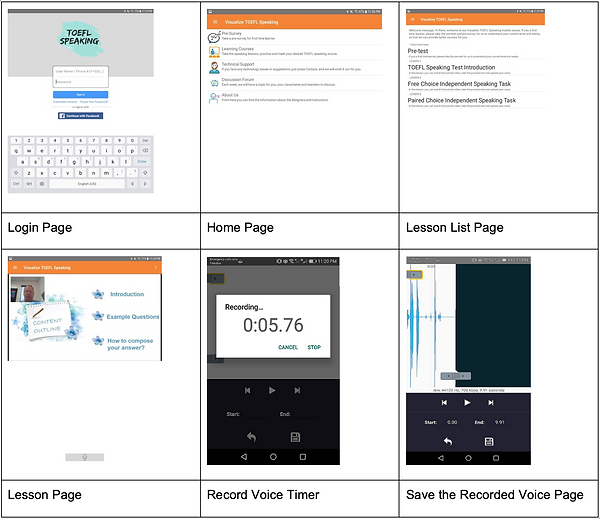
Screenshots of the prototype of the mobile app
Screenshots of the Version 1 of the mobile app
Screenshots of the Version 2 of the Visualization TOEFL Speaking mobile app
Outcomes
The project produced a functioning Android mobile learning application and an evidence-based mobile learning design framework. The project:
-
Translated learner research into concrete product and instructional requirements.
-
Developed a self-paced TOEFL speaking experience combining multimedia instruction, authentic practice, voice recording, peer interaction, and instructor feedback.
-
Progressed from storyboard and prototype through development, user testing, pilot implementation, and multiple redesigns.
-
Used direct learner and SME feedback to improve navigation, content sequencing, recording workflows, video length, and UI design.
-
Generated eight evidence-based mobile learning design principles connecting learning theory with practical design decisions.
-
Demonstrated that effective mobile learning design requires continuous alignment among learner needs, pedagogy, technology, and user experience.
Technology & Design Skills
Design & Prototyping
-
Mobile Learning Design
-
Storyboarding
-
Appy Pie
-
UI/UX Design
-
Mobile Interface Design
-
Rapid Prototyping
Research & Evaluation
-
Learner Needs Analysis
-
Surveys & Interviews
-
SME Review
-
Usability Testing
-
Focus Groups
-
Design-Based Research
What I Learned
Designing Visualize TOEFL Speaking taught me that the strongest design decisions often emerge after a product leaves the designer's hands and reaches real users.
I began the project by grounding design decisions in learning theory and learner research, but prototyping and testing revealed needs that could not have been fully anticipated in advance. Learners showed us where interactions interrupted their workflow, where content created unnecessary cognitive load, and where the interface could better support practice.
Seeing feedback directly influence the next version of the application strengthened my commitment to evidence-based, iterative design. I learned to treat prototypes not as early versions of a final answer, but as tools for asking better questions about learners' experiences.
Most importantly, the project reinforced that effective learning technology emerges at the intersection of learning science, user needs, and thoughtful product design.